IMAGE 1
A research project by Daniel Mangelsdorf
STUDIO.LIVE
Use the model yourself, right now. Pick a starter photo, grow the canvas in either direction, or brush over anything you want repainted — every candidate is sampled on demand by the trained checkpoint running on a cloud GPU.
How the model was trained
3,450 photographs, no labels. Each training step hides part of a photo and grades the model on how well it paints the hidden part back.
Below are four real training images. Choose a mask type to see what gets hidden from the model — the five types and their percentages are exactly what was used in training.
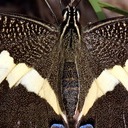
one-sided outpainting band — the main job
During training the model only sees the unmasked region and must paint the hidden region back. One-sided bands make up 65% of training because extending an image sideways is the main job; the other types teach corners, edges and interior repair. REROLL uses the same random mask generator as the training code.
Each training sample is also randomly zoomed, cropped, mirrored and colour-shifted, so the model never sees the same crop twice.
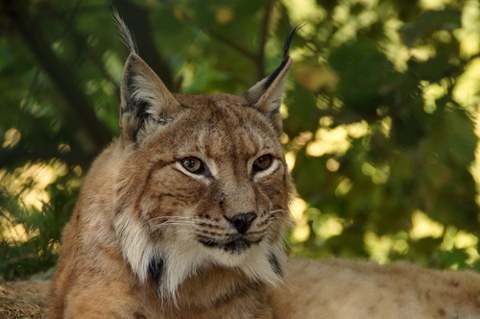

random crop #1
mirrored no (50% chance)
colour shift none (30% chance, ±5%)
3,450 photos is a small dataset, so augmentation stretches it: over 250k steps the model saw 5 million crops — about 1,450 different views of each photo. Random zoom decides how much of the scene fits in the 128px crop, so the same photo teaches both fine texture and overall structure. The crops shown are real crops from the training data at each zoom level.
One expansion, start to finish
The loop below runs once per committed tile — the interactive sim further down replays sixteen of them back to back.
WINDOW + MASK
Slide a 128px window over the canvas frontier. Pixels already committed are 'known' (mask=1); the strip to invent is 'unknown' (mask=0). The webapp picks whichever 4×4-tile window covers the target cell with the most accepted context.
RE-NOISE THE KNOWN REGION
At every sampling step the known pixels are pushed back onto the forward diffusion trajectory at the current noise level, so the network always sees a canvas that looks like its training data — no clean/noisy mismatch at the seam.
CONDITIONAL DENOISE
The U-Net reads 7 channels — noisy canvas, clean context, mask — and predicts v. 30 DDIM steps walk pure noise down to an image that agrees with the context on structure, color and grain.
CANDIDATE BATCH
Diffusion is stochastic: the same context with 4 different seeds gives 4 different futures. Candidates are sampled as one batch, so extra options are nearly free on the GPU.
SELECT + COMMIT
A human picks the best candidate (the webapp's accept/undo loop). Known pixels are composited back exactly — the model never gets to repaint what's already committed.
ADVANCE + REPEAT
Shift the window by the stride (64px default, 32px keeps more context) and go again. Each pass grows the canvas; nothing bounds how far it can extend — except drift.
What the run actually looked like
Full 250k-step training run on a single RTX 3090 — batch 20, BF16, 1.77 it/s, about 1.6 days of GPU time.
Real outputs, unretouched
Everything below came out of the trained checkpoint via sample.py on held-out DIV2K-valid images the model never saw in training.

Candidate batch. Leftmost: the context — a palm frond with the right half masked (shown black). Then four completions from four seeds over the identical context. Each invents a different but plausible continuation of the frond; this one-context-many-futures operation is the core primitive the interactive webapp is built on.

Harder context.Cluttered scene, purple glove. The seeds diverge much more here — some completions stay abstract, one invents new objects. When context under-determines the continuation, candidate variety goes up; that's exactly when having a human pick (or, someday, a scorer) matters most.
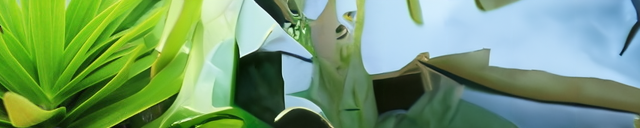
Progressive expansion, 8 tiles.Grown 128→640px from the left. The first strips genuinely continue the plant; by the right edge the foliage is pure invention but still on-theme. Note there is no visible seam at any of the eight commit boundaries — the re-noising trick doing its job.

Drift, exhibit A.Same recipe pushed to 16 tiles (128→1152px), seeded with a lion's face. Around tile 4 the lion has left the 64px context window and the panorama starts free-associating: fabric, weather, a red something. Locally every seam is clean; globally the plot is lost. This strip is the one you can replay in EXPANDER.SIM below.
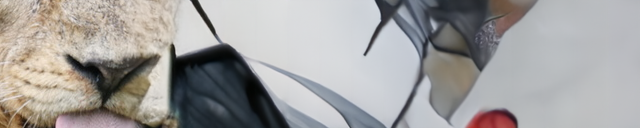
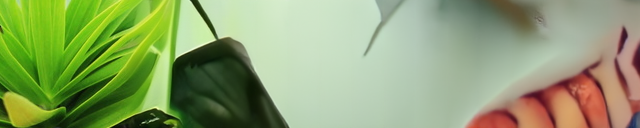
Stride experiment.Same 16 tiles, but committing only 32 new pixels per pass (75% context kept, 2× the compute per distance). Both the lion and the plant hold coherence a little longer per pixel travelled — and both still end somewhere the seed image never implied. Smaller strides slow drift; they don't stop it.
EXPANDER.SIM
Watch the canvas grow tile by tile. Start from the 128px seed crop and press EXPAND to commit the next strip — exactly as the model generated it. Switch strides to compare how fast each run walks away from the lion.
replay mode: every strip you reveal is real model output — a stored 16-tile run of sample.py --mode expand on a DIV2K-valid crop (seed 128px, 30 DDIM steps per tile). The browser is only cropping the finished panorama — for live sampling, use STUDIO.LIVE above. Watch the subject drift as the context window walks away from the original pixels.
Ledger
Honest accounting: what exists and runs, what is unresolved, what comes next.
- Full training run complete: 250k steps, 92M params, EMA checkpoints at 6 milestones.
- Masked DDIM sampler with forward-trajectory re-noising and exact known-pixel compositing.
- Candidate + recursive-expansion demos (sample.py), evaluated on held-out DIV2K-valid.
- FastAPI webapp: unbounded tile canvas, click-to-expand, 4-candidate picker, accept/undo — runs locally against the checkpoint.
- Live GPU endpoint: the checkpoint deployed on a serverless cloud GPU behind an authenticated proxy — STUDIO.LIVE above samples from it on demand.
- Multi-scale JPEG crop cache (8.9 GB) so Windows dataloader workers keep the 3090 fed.
- Automatic candidate scoring. Today a human picks; no metric yet distinguishes a good continuation from a plausible-looking wrong one.
- Drift. Content decoheres once the subject leaves the context window, at stride 64 and stride 32 alike. Long-range memory or global conditioning is unsolved here.
- Seam metrics: seams look invisible, but there's no quantitative boundary-artifact measure beyond eyeballing.
- ONNX export of the EMA U-Net so EXPANDER.SIM can sample live in the browser instead of replaying stored runs.
- Anchor experiments against drift: keep a downscaled global canvas as an extra conditioning channel.
- Scale past the 128px canvas — either a bigger window or coarse-to-fine expansion.